
Building a Group Video Room with Vibsy in Three API Calls
A hands-on walkthrough of the Vibsy room lifecycle: create a room, generate a participant token, and join from the Web SDK, with no media servers or WebRTC plumbing to manage.
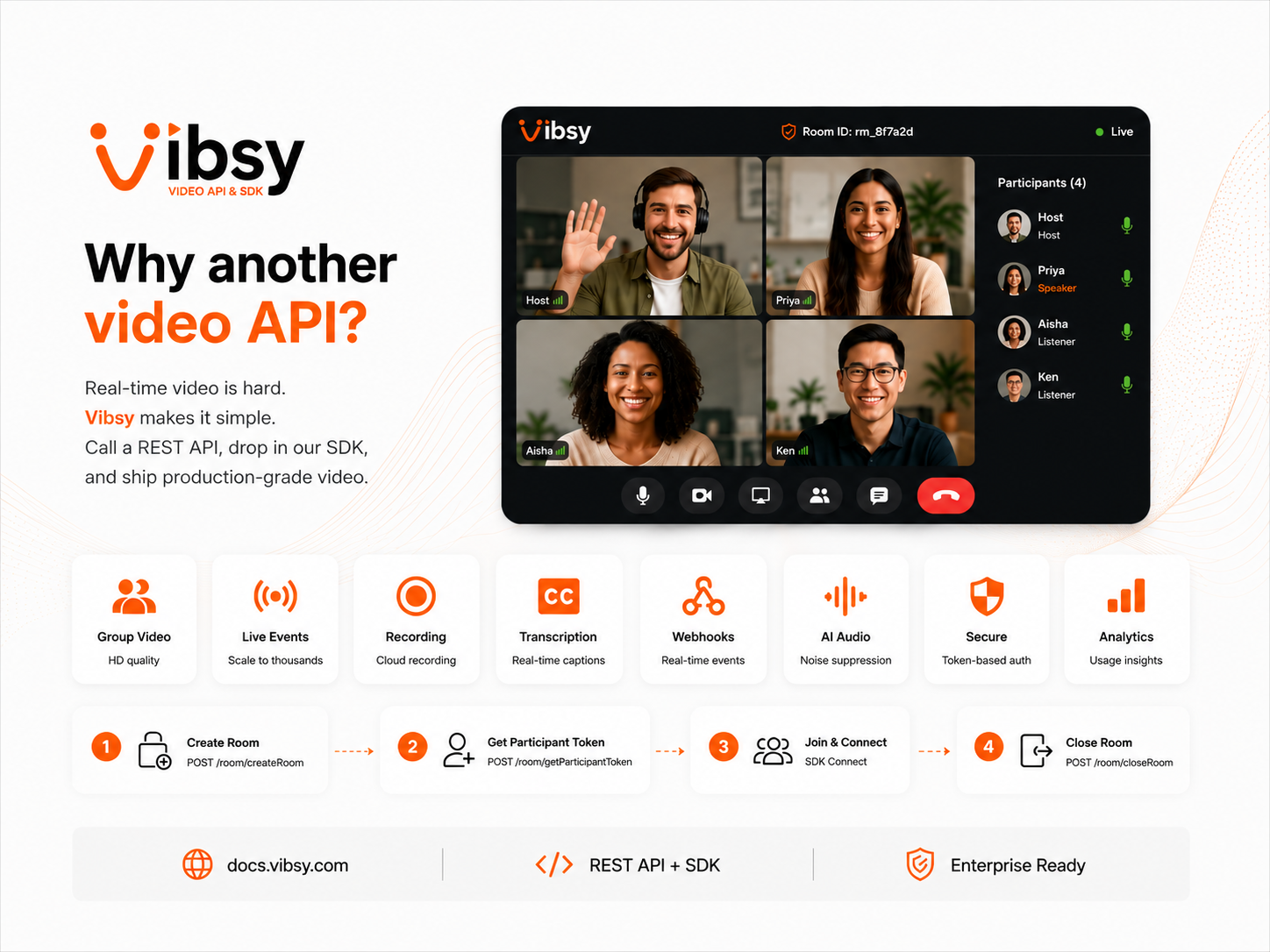
Why another video API?
Real-time video is deceptively hard to run yourself: signaling, TURN servers, adaptive bitrate, recording pipelines, and a dozen edge cases across browsers and networks. Vibsy exists so you don't have to build any of that — you call a REST API, drop in an SDK, and get a production-grade video room.
This walkthrough builds a group video call from scratch, using the same room lifecycle Vibsy's own API is built around.
The room lifecycle
Every Vibsy session follows the same five steps, whether it's a two-person call or a live event for thousands:
- Create a room — returns a
room_idand a host token. - Share the
room_idwith whoever needs to join. - Each participant requests a token via
getParticipantToken. - Participants connect through the SDK using their token.
- Close the room when the session ends.
Let's build it.
Step 1: Create a room
A room is an isolated video session — nothing is shared between rooms, and nothing persists once it's closed.
const res = await fetch('https://api.vibsy.com/room/createRoom', {
  method: 'POST',
  headers: { 'Content-Type': 'application/json' },
  body: JSON.stringify({
    apiKey: process.env.VIBSY_API_KEY,
    room_name: 'design-review',
    display_name: 'Host',
  }),
});

const { data } = await res.json();
// data.room_id → share with participants
// data.token   → the host's SDK token
Step 2: Generate a participant token
Anyone joining the room, including the host, needs a token scoped to that room and their identity. Tokens are short-lived and per-participant, so access can be revoked or rotated without touching the room itself.
const res = await fetch('https://api.vibsy.com/room/getParticipantToken', {
  method: 'POST',
  headers: { 'Content-Type': 'application/json' },
  body: JSON.stringify({
    apiKey: process.env.VIBSY_API_KEY,
    room_id: data.room_id,
    display_name: 'Priya',
  }),
});

const { data: participant } = await res.json();
// participant.token → hand this to the browser SDK
Step 3: Join from the SDK
The token is the only thing that crosses the wire to the browser. From there, the Web SDK owns the WebRTC connection, media negotiation, and reconnect logic.
import { VibsyRoom } from '@vibsy/sdk';

const room = new VibsyRoom({ token: participant.token });

room.on('participant-connected', (p) => console.log(`${p.displayName} joined`));
room.on('track-subscribed', (track, p) => track.attach(videoContainer));

await room.connect();
That's it — three API calls and one SDK connection, and you have a working group video room with camera, mic, and screen share, without running a single media server.
What you get beyond the basics
The same room model extends to the rest of Vibsy's product surface without any extra setup:
- Live Events — webinar-style rooms with host, presenter, and attendee roles, hand-raise, and stage controls.
- Recording & Composition — per-participant tracks or a single composed MP4, with configurable retention.
- Transcription & AI Audio — real-time transcription and translation, plus AI noise suppression.
- Webhooks — every room and recording event pushed to your backend in real time.
- Virtual Backgrounds — on-device, GPU-accelerated background blur and replace, so nothing leaves the client.
The JavaScript/Web SDK and REST API are generally available today; Android and iOS SDKs are coming soon, so the API integration you build now carries straight over once native clients ship.
Pricing
Every account starts on Basic, free, with 3,000 minutes a month, group video rooms, and the REST API and Web SDK — no credit card required. Pro is pay-as-you-go at $0.0031 per participant-minute and adds events, recording, transcription, webhooks, and usage analytics. Enterprise adds volume pricing, data residency, audit logs, and dedicated support.
Try it
The createRoom → getParticipantToken → connect flow above is the entire integration surface for a first call. From here, the API reference covers everything else — recording, events, and webhooks included.